
In this guideJump to a section
- Define the communication job first
- Compare the categories by constraints
- Check the operating location
- Verify current service and account readiness
- Calculate power for the whole system
- Plan the data budget and local network
- Practice the complete setup
- Know when not to use it
- Primary sources
- Your next step
INFO
Treat satellite internet as one communication layer, not a rescue guarantee. Define the job, verify the current service plan and coverage, inspect the real operating location, calculate power for the complete setup, and practice the exact account and hardware before relying on it.
Portable satellite internet may provide maps, official updates, messages, or work access where employer policy allows when local cable, fiber, or cellular paths are disrupted. It may also be unusable where the sky view, power, service status, weather, account, or placement rules do not fit.
This is a category decision, not a product ranking. Hardware, plans, roaming rules, availability, prices, and specifications change. Use current manufacturer documentation for the exact equipment and service you are considering.
Define the communication job first
Write the minimum successful outcome:
- Send a short status and location message
- Receive official weather and evacuation information
- Give several household devices limited data access
- Make an approved voice or video call
- Reach work systems for a short essential task
If the job is only a brief check-in, a satellite messenger or another lower-power path may be simpler than broadband equipment. If the job requires several devices or large data transfers, document the higher power, placement, and service dependencies before buying.
The complete emergency communication guide should define who sends the message, what it says, and what happens when satellite service is not available.
Compare the categories by constraints
Emergency communication categories
| Option | Often fits | Verify before relying on it |
|---|---|---|
| Portable satellite internet | A household needs a data connection for several devices and can support the equipment. | Current service, coverage, clear sky, power, mounting or placement, account access, and setup time. |
| Satellite messenger | The priority is concise status, location, or device-supported emergency messaging. | Coverage, subscription, message limits, emergency feature behavior, phone pairing, and battery care. |
| Cellular phone or hotspot | Cellular service remains available or returns intermittently. | Local coverage, battery, plan limits, congestion, and approved applications. |
| NOAA Weather Radio | The need is official weather and hazard information in a covered area. | Local transmitter, receiver compatibility, reception, batteries, and current outages. |
| FRS or GMRS radio | Nearby people need local coordination over a tested route. | Terrain, compatible equipment, batteries, privacy limits, and the current rules for its radio service. |
Check the operating location
Inspect every likely use location: the home, apartment balcony, yard, vehicle stop, evacuation destination, or approved work site. A product’s coverage map does not prove that a particular spot has a usable view of the sky or allows equipment placement.
Confirm:
- The manufacturer’s required sky view and orientation
- A stable location outside standing water and traffic paths
- Safe cable routing that does not block an exit
- Building, rental, shelter, park, or homeowners association rules
- Wind, precipitation, temperature, and mounting limits in the exact manual
- Whether the operator can carry, place, and retrieve the equipment
- What happens if conditions make outdoor setup unsafe
Do not climb onto a roof or enter a hazardous area to preserve connectivity. Do not delay evacuation to pack, align, or troubleshoot the terminal.
Verify current service and account readiness
Before purchase and again before a high-risk season, read the provider’s current terms for the exact hardware and plan. For Starlink equipment, begin with the official Starlink support portal and the manual supplied for the specific terminal. For any other provider, use its equivalent first-party manual and service documents.
Record:
- The date the service terms and support information were checked
- Whether the service is available at the intended locations
- Activation, pause, resume, roaming, and cancellation rules
- Account credentials and approved recovery method
- Required phone application and software updates
- Data priority, limits, or traffic-management terms
- Support contact and the equipment identifier
- What features work when the paired phone has no cellular service
Do not rely on a reseller summary, old screenshot, or another model’s power specification. Keep account-recovery information available without exposing the password on a public emergency card.
Calculate power for the whole system
The terminal is not always the only load. Include the router if separate, power supply, any approved converter, the phone used for setup, and the client devices that must connect.
| Component | Label or measured watts | Hours planned | Required? |
|---|---|---|---|
| Satellite terminal | |||
| Router or gateway | |||
| Phone for setup and messages | |||
| Approved work or household device |
watts x hours = watt-hours
For a model-specific example, Starlink’s Mini specifications sheet lists 25-40 W average power consumption. That is 25-40 Wh per hour for the Mini unit, which includes integrated Wi-Fi, before adding other equipment, conversion losses, or reserve; it does not predict a household’s actual draw or runtime.
Use the manufacturer’s current normal and peak power information when it is published for the exact model, then compare it with an ordinary-day measurement. Signal conditions, software, temperature, connected devices, and operating mode can change consumption.
The Battery Runtime Calculator helps separate load, usable capacity, conversion loss, and reserve. It cannot confirm that a power bank, cable, inverter, or voltage adapter is compatible. Follow the exact manual and use only manufacturer-supported power paths.
The backup power for electronics guide helps protect phone and alert power before a broadband terminal consumes the reserve. If you are sizing a portable 1 kWh station for a multi-hour satellite and laptop session, see our EcoFlow DELTA 3 vs. Jackery Explorer 1000 v2 comparison:
Jackery Explorer 1000 v2
Documents 1,070 Wh nominal LiFePO4 capacity, 1,500 W continuous AC output, and a 23.8 lb carry weight for field or yard staging alongside a satellite terminal and laptop. Confirm adapter and cable requirements in both manuals.
- Nominal capacity
- 1,070 Wh
- Continuous AC output
- 1,500 W
- Base-unit weight
- 23.8 lb
Source records checked on 2026-10-04. This is research, not hands-on testing. Read the manufacturer manual.
Paid links — we may earn a commission. As an Amazon Associate I earn from qualifying purchases.
 Check price at Amazon
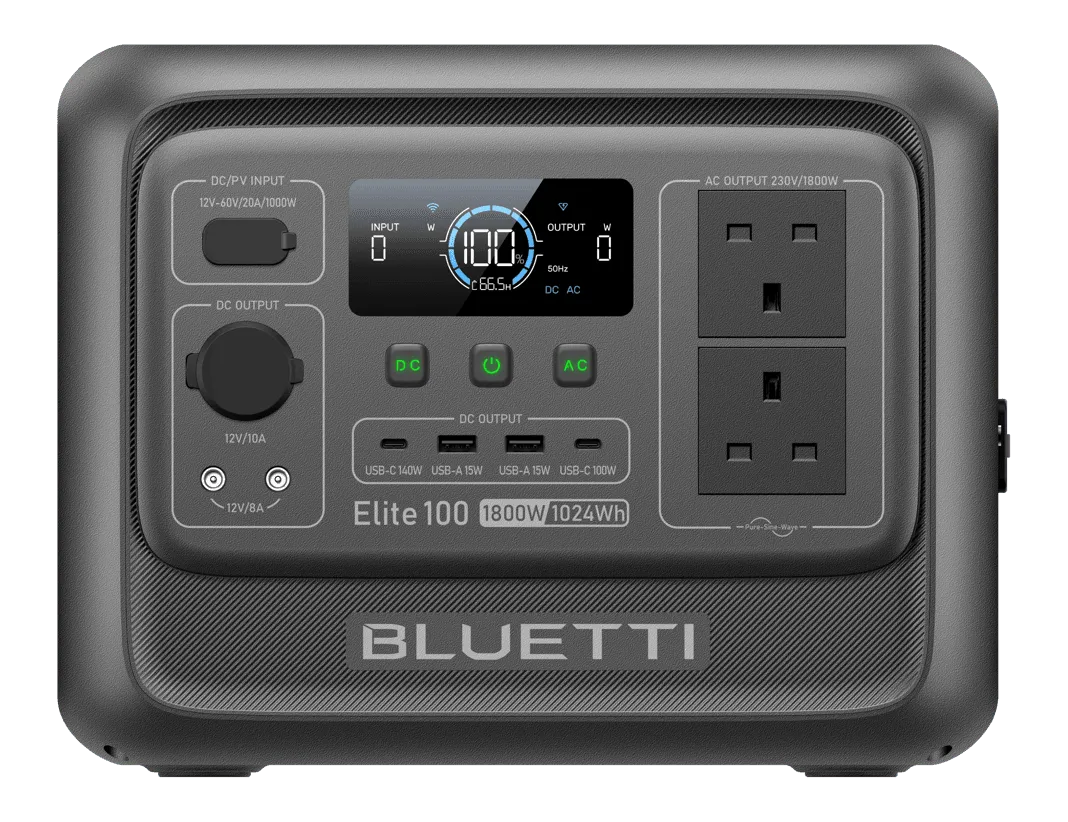
 BLUETTI Elite 100 V2
Documents 1,024 Wh LiFePO4 capacity, 1,800 W continuous AC output, and up to 1,000 W solar input at 25.3 lb when daytime solar replenishment is part of a multi-day communication plan.
- Nominal capacity
- 1,024 Wh
- Continuous AC output
- 1,800 W
- Base-unit weight
- 25.3 lb
Source records checked on 2026-10-22. This is research, not hands-on testing. Read the manufacturer manual.
Plan the data budget and local network
Decide which devices may connect and which activities wait. During an outage, software updates, cloud photo sync, entertainment streaming, and background backups can compete with an essential message or work task.
- Use a strong unique network password
- Update the terminal and administration device before the season
- Turn off nonessential automatic transfers when appropriate
- Follow employer rules for VPN, customer data, and approved networks
- Keep the administration account protected with multifactor authentication when available
- Know how to disconnect an unknown device and reset access safely
The CISA Secure Our World page is marked archived. Treat any general account-security reminders there as background only; use the current instructions from the account provider and do not follow unexpected urgent renewal links during an outage.
Practice the complete setup
Do not make the first activation attempt during a warning or evacuation.
- Carry the packed equipment to the likely operating location.
- Set it up without improvising a mount, cable, or power adapter.
- Start from the stored account and recovery instructions.
- Connect the intended devices and complete one representative task.
- Measure the complete load and observe battery use.
- Shut down, cool, dry, inspect, and repack according to the manual.
- Write down the setup time, weak point, and fallback action.
Repeat after a plan, terminal, application, power system, or intended location changes. If only one person can operate the setup, train a second person or reduce the plan to a simpler layer.
Know when not to use it
Portable satellite internet is not the right response when:
- Local authorities instruct the household to move immediately
- The only operating location is unsafe or prohibited
- The equipment would consume power reserved for a more important need
- Current service cannot be confirmed
- The household needs only short status messages and a simpler path fits
- The user cannot safely carry or set up the complete system
- The communication plan has no fallback when it fails
Use the no-internet communication stack to keep paper, official alerts, local radio, and meeting-place instructions ready.
Portable satellite internet FAQ
- Can portable satellite internet work during a power outage?
- It may if the exact equipment has current service, a safe usable sky view, compatible backup power, and an activated account. Test the complete setup and keep a lower-power fallback.
- How much battery power does satellite internet need?
- Use current manufacturer information and a measurement for the exact terminal, router, power supply, phone, and client devices. Starlink's Mini specifications sheet lists 25-40 W average for that terminal model, but this is not whole-system draw or a runtime promise. Multiply the measured load by planned hours, then account for usable capacity, losses, and reserve.
- Is satellite internet better than a satellite messenger?
- Neither is always better. A messenger may suit short status or location messages with less equipment, while broadband can serve more data needs but adds power, placement, account, and setup dependencies.
- Does a portable satellite terminal replace emergency alerts?
- No. Keep Wireless Emergency Alerts, local emergency-management information, NOAA Weather Radio where suitable, and the household meeting and check-in plan. Follow official instructions rather than waiting for an internet connection.
Primary sources
- National Weather Service: Wireless Emergency Alerts
- NOAA/National Weather Service: NOAA Weather Radio
- eCFR: 47 CFR Part 95, Personal Radio Services
- CISA: Secure Our World — archived campaign
- Starlink: Official Support
- Starlink: MINI Specifications
Your next step
Carry the complete setup to its likely operating location and complete one real message or approved task on an ordinary day. Record power use, setup time, and the fallback action; if the location or reserve does not work, choose a simpler communication layer.