In this guideJump to a section
- 1. Define three power tiers
- 2. Measure power and energy separately
- 3. Estimate usable runtime
- 4. Match the battery layer to the job
- 5. Decide whether home internet is worth powering
- 6. Plan laptop work as an energy budget
- 7. Use safe charging and storage practices
- 8. Test and record the result
- Primary sources
- Protect the communication reserve in a real test
INFO
Start with the job and the load, not a battery size. Preserve phone and alert power first, decide whether the internet provider is likely to remain available, and run work electronics only within a written energy budget. A UPS can bridge short interruptions; a larger battery can extend selected loads; neither guarantees that an outside network is working.
The ordinary failure is a chain: a laptop is charged, but the router loses power; the router is backed up, but the provider is down; or a large display uses the reserve meant for phones. Separating communication, network, and work loads makes the plan easier to test and easier to reduce when an outage lasts longer than expected.
Build the communication decisions first in the emergency communication guide, then use this guide to power the devices that support them.
1. Define three power tiers
Tier 1: communication and alerts
- Primary and accessible phones
- A battery-capable weather radio or other official-alert receiver
- Any necessary assistive communication device
- A small light used to operate the equipment safely
Tier 2: network access
- Fiber terminal, cable modem, or other provider equipment inside the home
- Main router or mesh gateway
- Only the mesh nodes or network switch required for occupied areas
Tier 3: work and information
- Laptop and its exact charger
- Security token or work phone
- One low-power display only when it materially supports the work
- Optional printer or other device only if the task cannot wait
Keep a reserve for Tier 1. Entertainment, gaming hardware, desktop towers, printers, and large displays can wait unless the household has a specific, measured reason to include them.
2. Measure power and energy separately
Power in watts determines what can run at one time. Energy in watt-hours determines how long it may run.
watts x hours used = watt-hours
Use the device label, power-adapter label, current manual, or a suitable plug-in meter. Adapter maximum output is not always the device’s normal draw, so a measurement can improve the estimate. Include every powered part of the path. A fiber terminal hidden in a utility cabinet can be as important as the router on a desk.
Electronics load worksheet
| Load | How to verify | Decision to record |
|---|---|---|
| Phone or tablet | Battery capacity, charger rating, and observed charging needs. | How often it is charged and the reserve kept for alerts and calls. |
| Modem, fiber terminal, and router | Each power adapter or a measured combined load. | Which equipment is required and what happens when the provider is down. |
| Mesh node or switch | Exact model label, manual, or measurement. | Whether that node serves an occupied or safety-relevant area. |
| Laptop | Actual charger and a representative work session. | Low-power work mode, charge schedule, and work that can be deferred. |
| Radio or satellite device | Current manufacturer manual for the complete setup. | Check-in schedule, standby behavior, and fallback path. |
The Department of Energy explains that rechargeable batteries store energy chemically and release electricity through an external circuit. That basic energy store is finite. Product displays and theoretical capacity do not remove conversion losses, reserve needs, temperature limits, or battery aging. See DOE’s battery overview for the underlying concept, then follow the exact product manual for operating limits.
3. Estimate usable runtime
A practical planning estimate depends on which energy value you have:
- Starting from nameplate energy:
runtime hours = nameplate Wh x (1 - reserve fraction) x delivery efficiency / load W. - Starting from documented delivered AC energy after reserve and conversion losses:
runtime hours = delivered AC Wh / load W.
Do not apply a second reserve or conversion-loss deduction to a delivered-energy figure that already includes it. Follow the product’s manual for usable capacity, output limits, temperature, and load-specific behavior; do not assume one efficiency percentage fits every inverter or USB output.
Use the Essential Loads Worksheet to record device loads, reserve, and the manual or label used. The Battery Runtime Calculator shows the assumptions and keeps capacity, reserve, efficiency, and load separate. Its result is a planning estimate. It cannot verify output compatibility, charger protocols, battery health, surge behavior, or the accuracy of a product display.
Example with round numbers: if an equipment group measures 30 watts and the planning budget assigns it 180 delivered AC watt-hours after reserve and conversion losses, the estimate is 6 hours. A controlled test with the exact equipment is still needed.
4. Match the battery layer to the job
USB battery banks
These can be a simple layer for phones, tablets, and compatible low-power devices. Verify connector type, supported charging protocol, output per port, and whether capacity is stated in watt-hours or milliamp-hours. A large milliamp-hour number without voltage and conversion context does not describe delivered energy to every device.
Do not assume a phone power bank can run a laptop. Confirm that both devices support the same USB Power Delivery profile and that the cable is rated for the required power.
If you plan to carry a power bank on a flight, check its watt-hour label and current baggage rules in the power-bank air-travel checklist.
Uninterruptible power supplies
A UPS can bridge brief interruptions and allow equipment to shut down cleanly. Choose it by the actual load and the manufacturer’s runtime curve, not only its VA label. Confirm which outlets are battery-backed, how replacement batteries are handled, and whether the unit’s output is suitable for the connected equipment.
For a home NAS, verify that the UPS can signal the exact storage system and that its shutdown process is documented; the NAS UPS checklist covers that model-specific path.
Never connect a heater, cooking appliance, laser printer, or other high-draw load unless the UPS manufacturer explicitly supports that use. Keep alarms audible and ventilation clear.
Portable power stations
A larger battery station can support selected AC, DC, or USB loads. Check usable energy, continuous output, surge rating, ports, recharge inputs, operating and storage temperatures, and battery-care instructions for the exact model. A high output rating does not create more stored energy, and a large capacity does not prove compatibility with every load.
If you expect a portable station to keep a computer on through an interruption, check the exact EPS or UPS behavior in the power-station transfer guide or compare 1 kWh models side by side in our BLUETTI Elite 100 V2 vs. Anker SOLIX C1000 Gen 2 comparison.
Paid links — we may earn a commission. As an Amazon Associate I earn from qualifying purchases.
 Check price at Amazon
 EcoFlow DELTA 3
Documents 1,024 Wh LFP capacity, six 120 V receptacles (1,800 W continuous), and 10 ms standby UPS switching for routers, fiber terminals, and laptop chargers. Test sensitive workstations before relying on pass-through mode.
- Nominal capacity
- 1,024 Wh
- Continuous AC output
- 1,800 W
- Base-unit weight
- 27.6 lb
Source records checked on 2026-10-04. This is research, not hands-on testing. Read the manufacturer manual.
Paid links — we may earn a commission. As an Amazon Associate I earn from qualifying purchases.
 Check price at Amazon
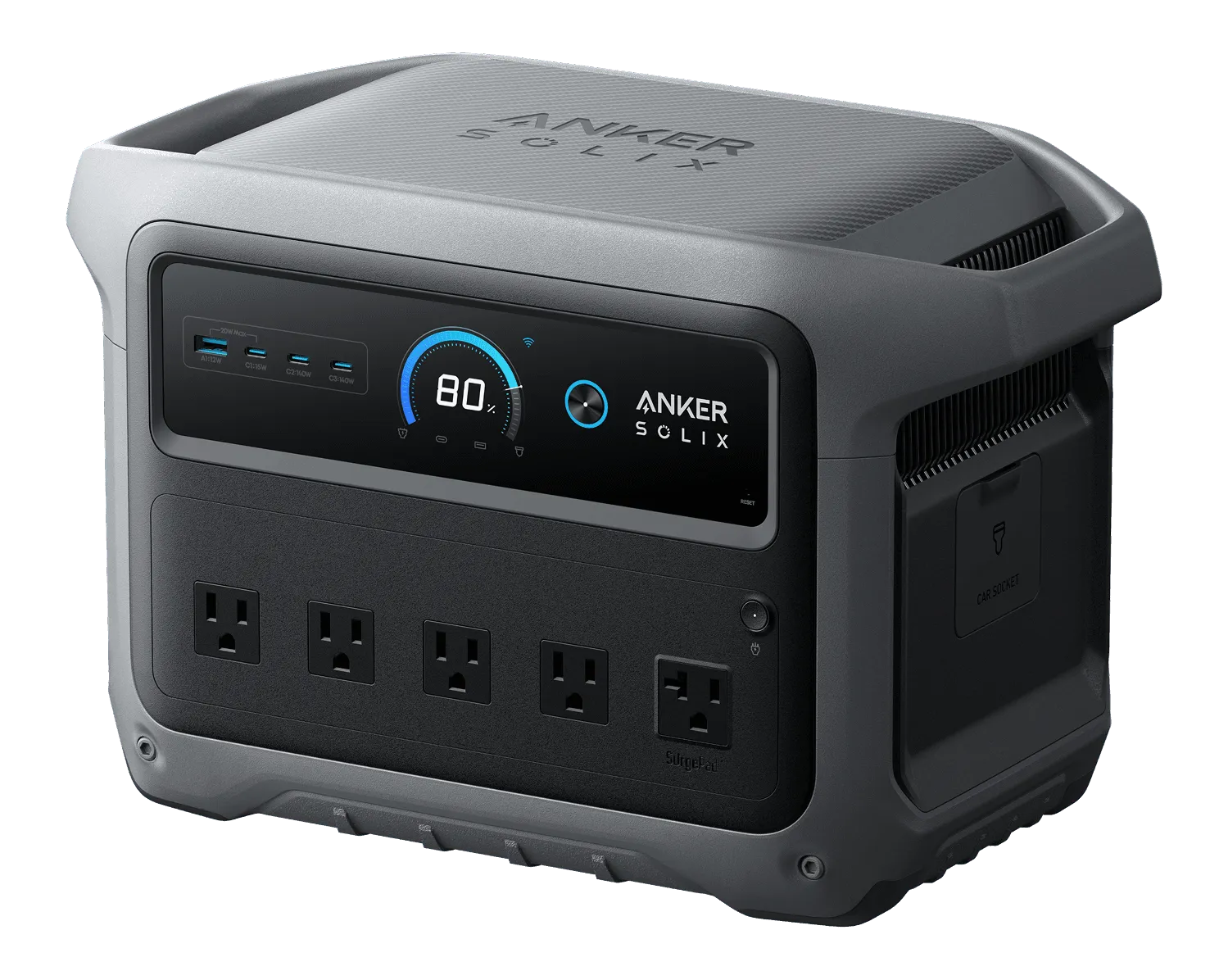
 Anker SOLIX C1000 Gen 2
Documents 1,024 Wh nominal capacity, 2,000 W continuous AC output across three ports, 600 W solar input ceiling, and 10 ms UPS switching at 24.9 lb.
- Nominal capacity
- 1,024 Wh
- Continuous AC output
- 2,000 W
- Base-unit weight
- 24.9 lb
Source records checked between 2026-10-04 and 2026-10-22. This is research, not hands-on testing. Read U.S. B1763 Generator Kit guide (covers the C1000 Gen 2 station).
Follow the manual before combining a power station with solar panels, a vehicle, another battery, or home wiring. Do not improvise an electrical connection or backfeed a receptacle.
Fiber households need to include the actual optical terminal. The fiber ONT backup dependency worksheet checks voice-only backup batteries, powered gateways, Wi-Fi nodes and upstream ISP failure. A UPS on only the Wi-Fi router may leave an unpowered ONT as the limiting point.
5. Decide whether home internet is worth powering
If the concern is voltage damage rather than runtime, use the household surge-protection guide to identify existing protection and questions for an electrician.
Backup power can keep equipment inside the home running only while the provider path outside the home is available. During a test, unplug utility power from the network equipment using the manufacturer’s normal procedure and verify:
- Which boxes must stay powered
- Whether service remains available
- Which mesh nodes are actually needed
- How long reconnection takes after a transfer
- Whether the cellular fallback works at the same time
If coverage inside a large home is the problem, use the mesh Wi-Fi planning guide before adding nodes. Every unnecessary powered node reduces runtime.
If the provider path is down, move to the no-internet communication stack instead of spending the remaining battery on equipment that cannot reach the network.
6. Plan laptop work as an energy budget
Agree with the employer on outage, security, availability, and data-handling expectations before an emergency. A household battery does not override company policy or make an unsafe home a suitable workplace.
Reduce the work load by:
- Charging the laptop fully before forecast events when practical
- Using the built-in display instead of external displays
- Closing nonessential applications and reducing screen brightness
- Downloading approved files for offline use
- Scheduling brief connection windows rather than remaining online continuously
- Moving to an approved alternate location before conditions become unsafe
The remote work continuity guide turns these decisions into a written work-stop, data, communication, and relocation plan.
7. Use safe charging and storage practices
Follow the manufacturer instructions for location, ventilation, compatible chargers, temperature, storage state, inspection, and disposal. Check the exact model against the U.S. Consumer Product Safety Commission recall database.
Stop using equipment that is swollen, cracked, leaking, recalled, wet, or unusually hot. Do not block an exit with charging equipment or place batteries under bedding or combustible clutter. Keep cords where they do not create a trip hazard. For a permanent battery, new circuit, transfer equipment, or uncertain wiring, use a qualified professional and follow local permit and inspection requirements.
Do not run a vehicle or combustion generator inside a garage or other enclosed or partly enclosed space to charge electronics. The safer generator decision path and carbon-monoxide limits are covered in the generator safety guide.
8. Test and record the result
On an ordinary day:
- Charge each battery according to its manual.
- Connect only the documented loads.
- Record starting charge, measured load, and start time.
- Confirm network service and device behavior after power transfer.
- Stop at the planned reserve rather than forcing a full discharge.
- Record elapsed time, remaining charge, alarms, heat, and unexpected shutdowns.
- Update the load sheet and label the required cables.
Repeat after battery replacement, equipment changes, firmware updates that affect power behavior, or a major change in the household’s communication and work needs.
Electronics backup power FAQ
- How do I calculate battery runtime for a router?
- Add the measured watts for every required device, including the modem or fiber terminal and router. Divide usable battery watt-hours after reserve and losses by that combined load, then test the exact setup.
- Will a UPS keep internet service working?
- It can keep compatible equipment inside the home powered for a limited time, but it cannot restore a failed provider network. Test the provider path and keep a cellular or offline fallback.
- Can one battery run both a router and a laptop?
- Only if its usable energy, continuous output, ports, cables, and charging protocols fit both loads. Add their watts and intended hours, preserve a communication reserve, and confirm the exact manuals.
- Should a battery be planned down to zero percent?
- No. Keep a reserve for communication, uncertainty, and safe shutdown. Displayed state of charge, temperature, conversion losses, and battery age can make actual runtime differ from an estimate.
For phone-only continuity, the power-bank charge-count example and record convert the stated voltage and mAh to Wh while making losses and phone use explicit.
Primary sources
Protect the communication reserve in a real test
Measure the Tier 1 communication loads and write the reserve that will not be spent on networking or work. Then test that reduced setup with utility power removed through the equipment’s normal procedure.