In this guideJump to a section
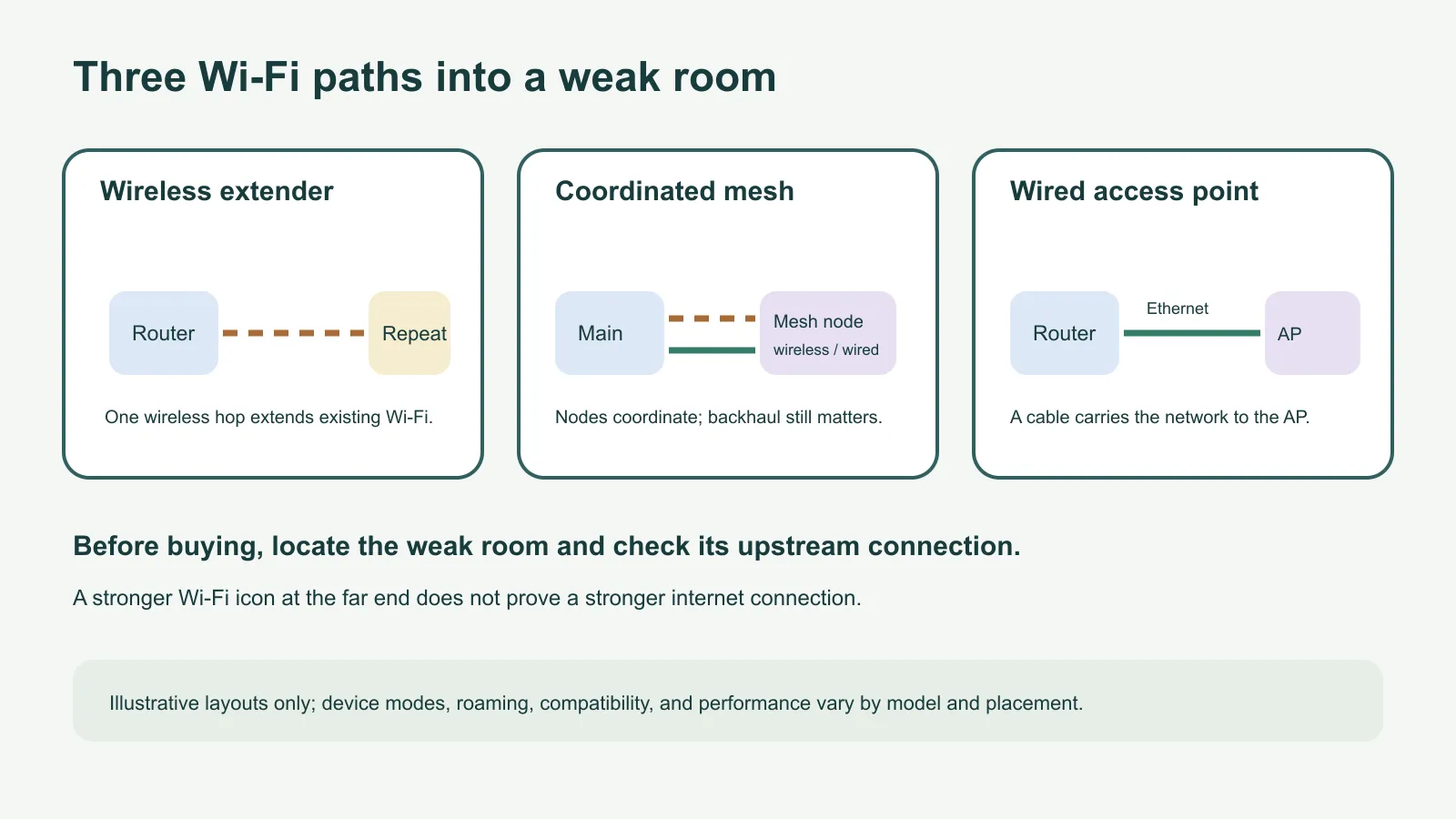
The office at the far end of the house drops video calls, but the kitchen beside the router works. Before buying a mesh kit, ask one practical question: does that office need a wireless relay, a coordinated network across several rooms, or a Wi-Fi point connected by a cable?
A wireless extender repeats a link from your existing router. Mesh nodes operate as one coordinated Wi-Fi system and can connect back to the main node wirelessly or over Ethernet. A wired access point, in the option compared here, carries the network to another location through Ethernet and broadcasts Wi-Fi there. The name on a package is not enough to tell you which path a particular model supports.
Choose by the connection available
| What you observe | Path to consider | Check before buying |
|---|---|---|
| One room is weak, while a nearby spot still has a usable connection to the router | A standard wireless extender/repeater may extend that existing link | Confirm the current router’s compatibility, whether the extender uses a new network name or supported unified system, and whether the target task works from the intended placement |
| Several rooms or floors have weak service and you want nodes managed as one network | A mesh system may fit better | Check whether the system replaces or works with your router, which nodes and backhaul types it supports, and the manufacturer’s compatibility and placement guidance |
| Ethernet already reaches the room that needs Wi-Fi | A wired access point is a direct option; a range extender may work if that exact model has AP mode | Confirm the device has the required Ethernet port and AP mode, and check how the router and access point manage network name and roaming |
A mesh system is not automatically faster than an extender, and an extender does not always cut throughput by a fixed amount. Results depend on the hardware, radios, bands, signal at the relay point, interference, client device, and whether the backhaul is wireless or wired. TP-Link’s product comparison illustrates why labels overlap: compatible EasyMesh or OneMesh extenders may join a managed mesh, and supported extenders can also have an access-point mode.
Separate the Wi-Fi link from internet service
If a device is slow everywhere, or both wired and wireless devices lose service, a new extender or access point may not address the cause. The problem may be the internet plan, modem or optical terminal, router, or provider connection. If the failure began after a power interruption, use the home internet recovery guide to trace the connection before changing Wi-Fi hardware.
For a single weak room, compare the current connection near the router and at the intended relay or access-point location. A repeater placed where it cannot maintain a useful upstream link may broadcast Wi-Fi into the room without improving the path back to the router. Follow the exact system app or manual for placement; there is no universal halfway point or coverage distance that works for every home.
If Ethernet is available, a wired access point avoids using Wi-Fi for that backhaul connection. Ubiquiti describes hardwiring its access points as its ideal method for performance and stability, while treating wireless meshing as an alternative when Ethernet is unavailable. That is manufacturer guidance, not a guarantee of a particular speed in your home.
Coverage path record
This short record can make a store comparison or support call more useful. If a detail is unknown, leave it blank and check the router or device manual.
| Question | Your notes |
|---|---|
| Which rooms lose the connection, and what task fails there? | |
| Does the problem affect one room, several areas, or the whole home? | |
| Does internet service work near the router and on a wired device? | |
| Router make/model and operating mode | |
| Is Ethernet already available in the weak room? | |
| Does the candidate device support repeater, mesh, or AP mode? | |
| Can it work with the current router or does it require a matching system? | |
| Does the household need one network name and roaming between rooms? | |
| After setup, what exact room and task will you test? |
After choosing the architecture, the large-home mesh guide covers room surveys, node placement, backhaul, and a repeatable acceptance test. This page makes the earlier architecture choice; it does not size a mesh kit or promise coverage by home area.